What Is Omnichannel Customer Support, and Does Your Business Need It?

Written by
Rajni
Reviewed by
Himanshu
Published 14 August 2026
Expert Verified
TL;DR
- Omnichannel customer support connects every channel, chat, email, phone, WhatsApp, social, into one conversation. Agents see the full history no matter where a customer started.
- It’s different from multichannel support, which offers many channels but keeps each one in its own silo, forcing customers to repeat themselves.
- Businesses with strong omnichannel strategies retain 89% of customers, compared to 33% for weak ones.
- The clearest sign you need it: customers already contact you across three or more channels, and your team can’t see what happened on the other two.
- Picking a platform comes down to five factors: channel match, unified data, automation, integrations, and total cost once every channel is added.
A customer emails about a delayed order. Gets no reply by evening, so they call. The agent on the phone has no record of the email. The customer explains the whole thing again. Two days later, they message on Instagram to check status. A third agent asks them to explain it once more.
That’s not a support failure of effort. Everyone on that team tried. It’s a data problem. The channels never talked to each other.
This is what omnichannel customer support actually fixes. Not more channels. Fewer repeated conversations.
What Is Omnichannel Customer Support?
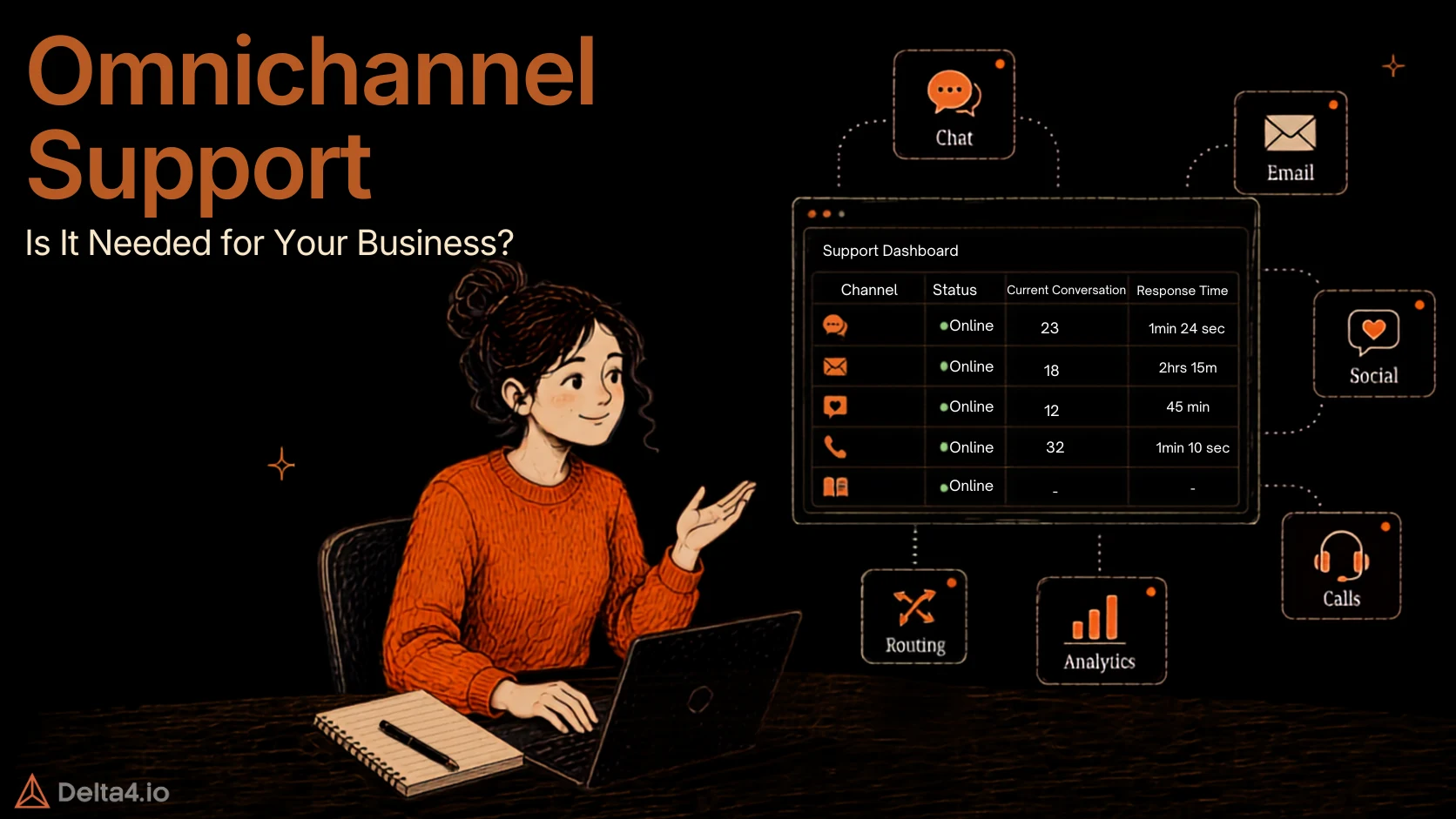
Omnichannel customer support is a support model where every channel, live chat, email, phone, social media, WhatsApp, SMS, feeds into one shared conversation tied to a single customer record. Switch from chat to email to phone, and the agent handling that switch sees everything that came before it. No blank screen. No re-explaining. The conversation moves to whichever agent or team fits, not whichever channel it happened to arrive on, and the answer stays the same whether the customer asks on the phone or on Twitter.
Omnichannel vs Multichannel Support: What’s the Real Difference
This is where most businesses get confused, and it’s worth being precise about, since it’s the difference between fixing the problem and just spending more money on channels.
- Multichannel support means you’re reachable on several channels: phone, email, chat, social. Each one runs as its own system with its own data. A customer can reach you five different ways, but none of those five ways know about each other.
- Omnichannel support means those same channels share one data layer. The channel becomes just the entry point, not a separate silo.
| Aspect | Multichannel | Omnichannel |
|---|---|---|
| Channels available | Many | Many |
| Customer data | Separate per channel | Unified across channels |
| Switching channels | Customer repeats the issue | Context carries over |
| Agent view | Only their channel’s history | Full history, any channel |
Here’s the practical test. If a customer contacts you on chat, then follows up by email, and your agent has to ask “can you remind me what this was about,” you’re running multichannel with extra steps, not omnichannel. That test costs nothing to run and tells you more than any vendor’s marketing page.
Why Omnichannel Customer Support Matters

The case for omnichannel support isn’t theoretical. It shows up directly in retention, satisfaction, and how much work your team repeats.
- Higher customer retention. Businesses with strong omnichannel strategies retain 89% of customers, compared to 33% for weak ones (Aberdeen Group, via Nextiva). Customers don’t have to start over whenever they switch from chat to email, social media, or phone.
- Better customer satisfaction. Omnichannel support lifts CSAT to roughly 67%, compared to 28% for disconnected multichannel setups (SQM Group, via Plivo). Fast, personalized responses across connected channels also cut the frustration of repeating an issue to different agents.
- Faster issue resolution. When agents can access conversation history and customer context across channels, they spend less time gathering information and more time solving the actual problem, cutting resolution times by up to 20% .
- Higher team productivity. Omnichannel support brings conversations into a unified workflow, while automation and AI handle repetitive questions. This lets support teams focus on complex issues that need human judgment.
- 24/7 customer support. Combining automation, chatbots, and self-service resources with human support lets a business stay available around the clock, even when the support team isn’t online.
- Greater scalability. Omnichannel systems manage conversations across multiple channels and handle higher inquiry volumes without requiring a business to grow its support team at the same rate.
- Consistent customer experience. Customers can move between channels without losing conversation history or context, whether they start with a chatbot, email, WhatsApp, social media, or a human agent.
- More opportunities to engage and convert. Businesses can proactively reach customers based on their behavior, answer questions at key moments, and use conversations to spot sales or lead-generation opportunities.
- Better global reach. Multilingual support paired with multiple channels lets a business serve customers across regions, languages, and time zones.
- A real competitive advantage. Many businesses offer support across multiple channels, but fewer deliver a genuinely connected experience, and that gap matters more now that 71% of customers expect personalized, connected interactions.
Omnichannel Support Across Different Business Types
What matters most from the list above depends heavily on the kind of business running it. Here’s a quick breakdown.
| Business Type | Primary Channels | Why Omnichannel Matters Most |
|---|---|---|
| Ecommerce / DTC | WhatsApp, Instagram, live chat, email | Order status and return questions spike during sales, and customers switch channels fast to get a faster answer |
| SaaS | In-app chat, email, Slack | Technical issues usually start in-app and continue over email, so context has to survive the switch |
| Healthcare | Phone, patient portal, SMS | Consistency and compliance matter more than speed, so every channel needs to give the same verified answer |
| Banking / Finance | Phone, secure chat, email | Customers expect the same account context whether they call or message, especially for disputes |
| Travel / Hospitality | WhatsApp, phone, social media | Time-sensitive issues like delayed bookings need instant visibility across whichever channel the customer picks |
| B2B Services | Email, Slack, phone | Support and sales cycles run long, so context has to persist across weeks, not just a single conversation |
How Do You Know If Your Business Needs Omnichannel Support?
Not every business needs to build this out today. Whether it makes sense usually comes down to two things: what’s already breaking, and what stage your business is at.
Signs the gap is already costing you:
- Customers repeat themselves. They mention it in reviews, in surveys, or directly to your team. That’s not a minor annoyance, it’s measurable churn risk.
- Your customer data lives in five different tools. Chat history in one system, email in another, order data in a third. No one has the full picture.
- You’re already fielding requests across three or more channels. Phone, email, chat, and social all get traffic, but your team can’t tell if the same customer is behind more than one of them.
- First-contact resolution is low. Agents spend more time hunting for context than actually solving the problem.
- Complaints about inconsistency are rising. One agent says one thing, another says something different, because neither can see the other’s notes.
Business situations where it matters most:
- Support volume is growing faster than your team. More tickets across more channels usually means more repeated context loss, not less.
- You’re expanding into new regions or languages. Serving multiple markets almost always means multiple channels and language needs arriving at once, not one at a time.
- You run ecommerce or DTC with seasonal spikes. Peak periods multiply channel switching, since customers chase whichever channel answers fastest.
- You’re in a regulated industry. Healthcare, finance, and similar sectors need consistent, auditable answers regardless of channel, which is hard to guarantee once data is siloed.
- Your support team already works out of separate tools for chat, email, and social. That split is the exact condition omnichannel support is built to fix.
When it can probably wait: a small team fielding most requests through one main channel, with only occasional traffic elsewhere, usually gets more value from fixing response times on that one channel first. The cost of going omnichannel pays off once multiple channels are carrying real volume, not before.
If two or more of the signs above sound familiar, or your business matches two or more of the situations, the gap isn’t a hiring problem. It’s a data-connection problem, and it’ll keep costing you until the channels are actually linked.
How Does Omnichannel Customer Support Work?

Here’s what actually happens, step by step, when a customer reaches out. If any of the signs from the last section sounded familiar, one of these steps is usually the one breaking down in your current setup.
- The customer reaches out on any channel. Chat, email, WhatsApp, social, or phone, the channel is just the entry point, not a separate system.
- The message matches to one customer profile. Using an email, phone number, or account ID, the system pulls up past orders, past conversations, and account details automatically.
- Routing sends it to the right place. Rules based on intent, urgency, or agent skill decide who handles it, not which channel it happened to arrive through.
- Repetitive requests get resolved on the spot. Order status checks, password resets, and basic troubleshooting get handled by an AI agent without a human touching them.
- Complex cases go to a human with full context already loaded. The agent sees the entire history the moment the conversation lands, so the customer isn’t asked to repeat anything.
- Channel switches carry the same context forward. If the customer moves from chat to email to phone mid-issue, the next agent sees everything that came before instead of a blank screen.
- Every interaction rolls into one set of reports. Response time, resolution rate, and CSAT get tracked across the whole operation, not channel by channel.
That’s the actual mechanism. A polished dashboard means little if step 2 fails, since everything after it depends on the system recognizing that a chat message and a phone call came from the same person.
Choosing an Omnichannel Support Platform: Factors to Consider
Picking a platform is a multi-year infrastructure decision, not a feature checklist. These are the factors that actually separate a good fit from an expensive mistake.
- Channel coverage. Check whether the omnichannel customer support platform supports the channels your customers actually use, WhatsApp, Instagram, live chat, email, SMS, or voice. Paying for channels you don’t need is wasted spend, and missing WhatsApp when that’s where your customers reach out is a bigger problem than price. Platforms like YourGPT cover web chat, WhatsApp, Instagram, Slack, Telegram, and email in one no-code setup, which is a useful benchmark for what full channel coverage should look like.
- A genuinely unified data model. Some omnichannel customer service software bolts separate channel tools onto one dashboard, which looks unified but still keeps the data siloed underneath. Ask directly whether every channel shares one customer record, or whether it’s just one screen showing five separate systems.
- Advanced AI and automation. Look for AI agents that can resolve repetitive questions on their own, not just route tickets to the right queue. This includes reply suggestions, intent detection, and workflows that trigger real actions like refunds or order updates, not just canned responses. Our explainer on what AI agents actually do covers this distinction in more depth.
- Multilingual support. If your customers speak more than one language, the platform should detect and reply in their language automatically. This matters for any business serving customers across regions or countries, not just large global enterprises.
- Human handoff. When a case needs a real person, check how the handoff actually works. The agent taking over should see the full conversation history the moment it lands, so the customer never has to repeat themselves after being transferred.
- Integration depth. The platform needs to connect directly to your CRM, helpdesk, and order systems, not just sit next to them. This lets human agents and AI agents pull real customer data instead of switching tools mid-conversation.
- Scalability. Pick a platform that can handle more channels and higher ticket volume later without needing a full rebuild.
- Compliance. For regulated industries, confirm SOC 2 and GDPR coverage, and check which plan tier actually includes them, since several vendors gate compliance features behind their top plan.
- True total cost. Premium channels like WhatsApp often carry separate per-message or per-resolution fees on top of the base plan. Price out your real channel mix before comparing sticker prices.
For a wider platform comparison, see our AI help desk software comparison, Zendesk alternatives roundup, or enterprise AI chatbot comparison.
How Do You Implement Omnichannel Customer Support?
Rolling this out works best in stages, not as a single big-bang switch.
- Map your current channels. List every place customers already reach you and how much volume each one gets. This tells you what actually needs connecting first.
- Audit your data silos. Find out where customer information currently sits, separate ticketing tool, separate CRM, separate spreadsheet, so you know exactly what needs to be unified.
- Pick a platform built on one data model. Revisit the factors above. This single decision determines whether the next steps actually solve the problem or just move it around.
- Set up routing and automation rules. Define how conversations get assigned by intent and urgency, and decide which repetitive questions get handled by AI agents instead of humans. Our guide to building an AI agent for customer service covers this step in more depth.
- Roll out one channel at a time. Start with your highest-volume channel, get it stable, then add the next. For channel-specific setup, see our walkthrough on deploying a WhatsApp AI agent.
- Train the team on the unified view. Agents need to actually use the shared history, not just have access to it. This is where most rollouts quietly fail.
- Track the right numbers. Watch CSAT, first-contact resolution, and average resolution time across the whole operation, not per channel, and adjust routing rules based on what the data shows.
Conclusion
Omnichannel customer support is becoming a defining part of the customer experience. The real work is connecting every channel into one continuous experience, so customers can switch between them without losing context or repeating their issues.
For businesses, this means faster resolutions, less customer effort, and a more efficient support team. But not every business needs to be everywhere at once. The real question is whether your current omnichannel customer service setup has gaps that disconnected channels are creating.
Here’s a simple test. Take a recent case that moved across two channels and ask whether the customer had to repeat anything. If the answer is yes, that’s the exact gap to close first, not a new channel, not a new tool, just that one connection.
Frequently Asked Questions
What is omnichannel customer support in simple terms?
Omnichannel customer support means every channel you use to reach customers, chat, email, phone, WhatsApp, social media, connects to one shared conversation. When a customer switches from email to phone, the agent already sees the full history. Nothing gets repeated. It’s different from just being available on many channels, since those channels also have to share the same data behind the scenes.
What should I look for in an omnichannel support platform?
Look for real channel coverage for wherever your customers already are, a genuinely unified data model rather than separate tools bolted together, AI automation that resolves repetitive questions, and a smooth handoff to a human when needed. Compliance and total cost matter too, since some vendors gate features like SOC 2 behind higher tiers. Platforms like YourGPT cover this by combining several of these channels and automation in one no-code setup.
What’s the difference between omnichannel and multichannel customer support
Multichannel means you’re reachable on several channels, phone, email, chat, social, but each one runs separately with its own data. Omnichannel connects those same channels to one shared customer record, so switching from chat to email doesn’t mean starting over. The simplest test is whether an agent on a second channel can see what happened on the first without asking the customer to repeat it.
Is there a platform that supports multichannel integration for my business?
Yes, several platforms connect multiple channels into one system rather than leaving them separate. The important detail is whether integration actually means a unified customer record or just multiple tools sitting on one dashboard. Platforms like YourGPT connect web chat, WhatsApp, Instagram, Slack, Telegram, and email into a single shared inbox, so a conversation started on one channel carries its full history if the customer follows up on another.
How do I know if my business needs omnichannel support?
A few signs point to yes. Customers already contact you across three or more channels, your team can’t see conversation history from other channels, or people frequently repeat their issue to different agents. If your support tools are already split across separate systems for chat, email, and social, that gap is usually costing you in resolution time and customer frustration, even if it hasn’t shown up as a formal complaint yet.
Does omnichannel customer support software cost more than regular support tools?
Not necessarily, but pricing structures vary more than the sticker price suggests. Some platforms charge flat per-seat pricing, while others add per-message or per-resolution fees for premium channels like WhatsApp, which adds up fast at volume. YourGPT, for example, prices flat rather than charging per resolution. The real cost comparison depends on your channel mix, not just the base plan price.

Article by
RajniAI & Tech | Senior Content Writer
Rajni is a senior content writer at Delta4 Infotech covering AI agents, automation, and no-code tools. She writes across the AI space, from chatbots and customer support to MCP and agent workflows, focused on how businesses actually put these tools to work.