Model Context Protocol (MCP): A New Standard for AI-Agent Communication

Written by
Himanshu
Reviewed by
Rohit Joshi
Last edited 21 July 2026
Expert Verified
The Integration Challenge : Before MCP
Developers have often faced the problem of building custom integration layers for each new service. When an AI agent needed to communicate with external systems like Slack, Gmail, or a custom database, developers had to write and maintain separate code for each connection. This process involved:
- Handling API Nuances: Every service comes with its own set of functionalities and limitations. For instance, an API might allow message deletion, but a developer may want the agent to only create or draft messages.
- Duplicated Effort: When the same integration logic was needed across different host applications (such as multiple IDEs or agents), the code had to be rewritten or heavily adapted.
- Security Concerns: Custom integrations require careful management of permissions and access controls to prevent unauthorized actions.
This patchwork approach often led to fragile systems, higher maintenance costs, and an increased risk of errors.
While custom integrations have been the norm, they come with inefficiencies that slow down development and increase maintenance overhead. This is where MCP steps in to change the game.
MCP: A Smarter Approach to AI-Agent Integration
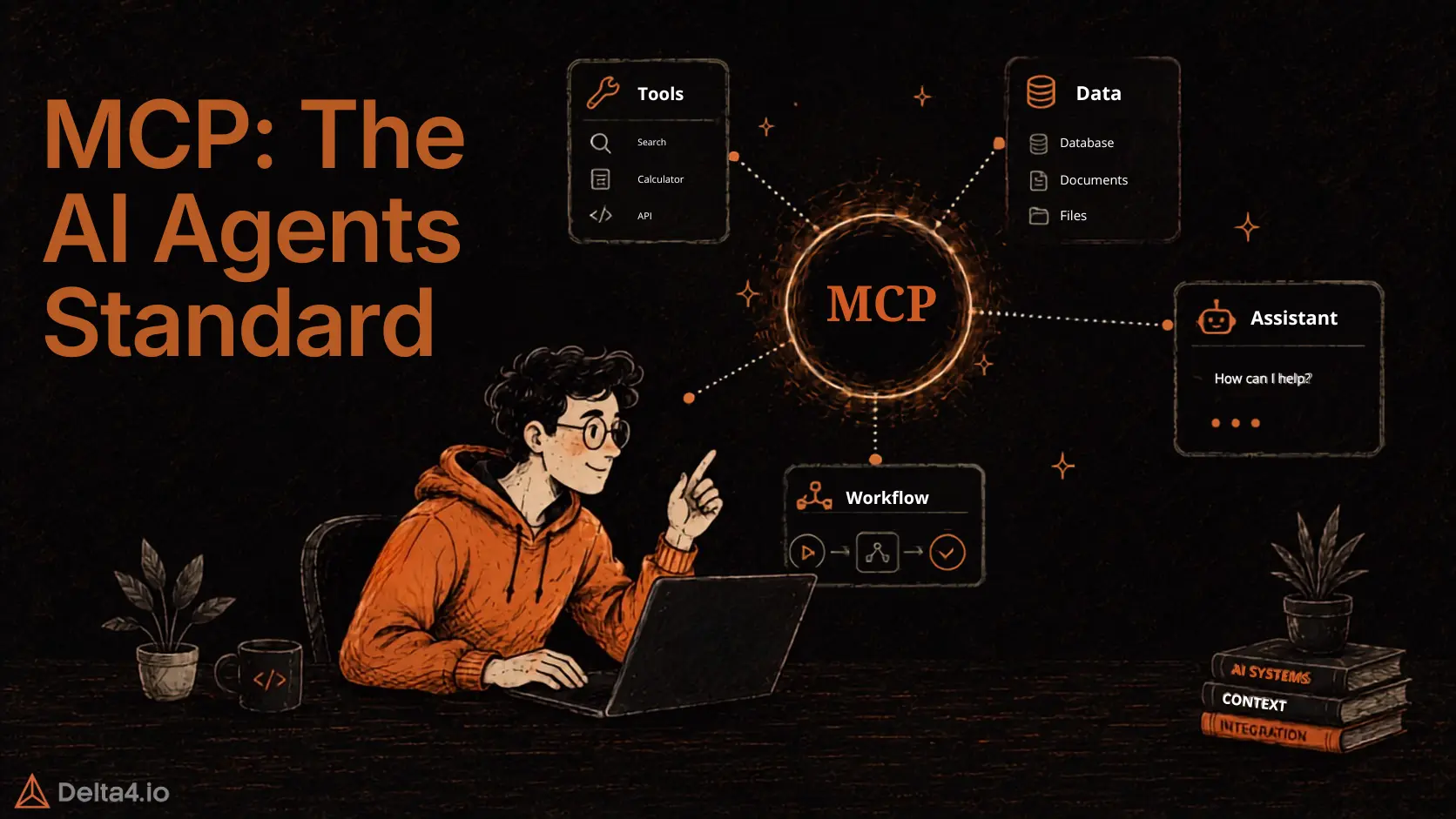
MCP changes the game by providing a standardized interface for communication between AI agents and external tools. Rather than rewriting integration code for every new host or service, MCP introduces a clear, consistent protocol. This standardization reduces complexity, cuts down on duplicated efforts, and makes it easier to manage security settings.
Anthropic’s introduction of MCP signals a shift from bespoke integration layers to a model where the integration logic is centralized. In practice, an MCP server takes over the responsibility of communicating with external APIs, allowing the AI agent to interact with these services without knowing their intricate details.
Understanding the Model Context Protocol (MCP): Core Concepts and Architecture
MCP is built around three core components that work together to streamline AI-agent communications:
1. Hosts: Running the AI Agents
Hosts are the front-end applications where AI agents operate. Whether it’s an integrated development environment (IDE) or a custom-built platform, hosts initiate communication with external services. With MCP, hosts simply send requests through a standardized protocol without worrying about the underlying API complexities.
2. Clients: Bridging Hosts and Servers
The client acts as a translator between the host and the MCP server. It formats payloads, ensures the data adheres to the required structure, and manages the exchange of information. By abstracting these details, the client lets developers focus on higher-level application functionality.
3. Servers: Exposing External Functionality
An MCP server is where the real integration work is centralized. External services—whether provided by companies like Slack or Gmail or built in-house—expose their functionality through the server. The server encapsulates all the integration logic and offers a consistent API for all connected clients and hosts.
To clarify the roles:
| Component | Function | Role in MCP |
|---|---|---|
| Host | Initiates interactions | Runs the AI agent and sends requests via the standardized protocol |
| Client | Manages data translation and communication | Formats payloads and handles the exchange between host and server |
| Server | Centralizes integration logic and API access | Exposes external service functionalities uniformly |
This architecture ensures that switching the host does not require rewriting integration logic, resulting in significant time and cost savings.
Simplifying Complex Integrations with MCP
Centralizing integration through MCP brings tangible benefits that reduce complexity and streamline development:
- Standardization: A unified protocol means every external service adheres to a single set of rules, reducing the need for custom solutions.
- Code Reuse: Once an MCP server is set up, multiple host applications can use the same integration logic without modifications.
- Enhanced Security: With integration logic residing on the server, it becomes easier to manage and enforce strict access controls.
- Lower Maintenance: Updates and bug fixes are applied centrally, reducing inconsistencies across different platforms.
In practice, these improvements lead to faster development cycles, lower maintenance costs, and more reliable AI systems.
Step-by-Step Guide: Implementing MCP in a Real-World Project
In this guide, you’ll set up an MCP server using the Python SDK that exposes a tool for creating GitHub repositories. With this server running, any host that speaks the MCP protocol—like Claude Desktop—can trigger the GitHub action without custom integration code for each host. Here’s how it works:
1. Prerequisites
- GitHub API Token: Generate a personal access token from GitHub with permissions to create repositories.
- Python Environment: Ensure you have Python 3 installed.
- MCP Python SDK: Install the official SDK (instructions available on the MCP GitHub repository).
2. The Code Implementation
Below is a simple Python script that creates an MCP server. It registers a tool named github_create_repo that calls GitHub’s API to create a new repository. The tool validates that a repository name is provided and then sends a request to GitHub.
import requestsfrom mcp.server import MCPServer, Tool# Set your GitHub API token hereGITHUB_API_TOKEN = "your-github-token"GITHUB_API_URL = "" def create_repo_tool(args): # Extract the repository name from the incoming request repo_name = args.get("repo_name") if not repo_name: raise ValueError("Missing 'repo_name' in arguments.") # Prepare headers and payload for GitHub API call headers = { "Authorization": f"token {GITHUB_API_TOKEN}", "Accept": "application/vnd.github+json", } payload = {"name": repo_name, "private": True} # Create the repository via GitHub's REST API response = requests.post(f"{GITHUB_API_URL}/user/repos", headers=headers, json=payload) if response.status_code != 201: # Return error details if the creation fails return {"error": response.json()} # Return the GitHub API response (repository details) on success return {"result": response.json()}if __name__ == "__main__": # Define the tool's input schema using JSON Schema standards create_repo_schema = { "type": "object", "properties": { "repo_name": { "type": "string", "description": "The name for the new GitHub repository." }, }, "required": ["repo_name"], } # Create an MCP tool definition for GitHub repository creation github_tool = Tool( name="github_create_repo", description="Creates a new GitHub repository.", input_schema=create_repo_schema, function=create_repo_tool, ) # Instantiate the MCP server and register the tool server = MCPServer() server.register_tool(github_tool) # Start the server on all network interfaces at port 5000 print("Starting MCP server for GitHub integration on port 5000...") server.run(host="0.0.0.0", port=5000)
3. How It Works
- Tool Registration: The MCP server registers a tool called
github_create_repoalong with its JSON schema. This schema informs the host about the expected input—a repository name in this case. - Tool Execution: When a host (for example, the Claude Desktop app) sends an MCP request invoking this tool, the server validates the payload and executes the
create_repo_toolfunction. The function makes a secure API call to GitHub and returns either a success response (with repository details) or an error message. - Standardization Benefits: With MCP, the integration logic resides solely in the MCP server. This means if you later decide to use another host (say, an AI-powered IDE), you don’t need to rewrite your integration code—the same MCP server and tool definition can be reused.
4. Testing Your MCP Server
After launching the server:
- Configure your host: In Claude Desktop (or any other host that supports MCP), add the MCP server details (e.g., via a configuration file or settings dialog) to point to your MCP server at
http://your-server-ip:5000. - Trigger the Tool: Ask the host to “create a GitHub repository called MyNewRepo” (or similar phrasing). The host will send an MCP message to your server, which in turn will execute the tool and create the repository on GitHub.
Real-World Impact
This GitHub integration exemplifies the core benefits of MCP:
- Simplified Integration: One standard protocol replaces the need for multiple custom connectors.
- Reusable Architecture: The same MCP server can serve different hosts, reducing redundant development.
- Enhanced Security: The server controls API access and enforces defined schemas, making permission management straightforward.
By adopting MCP, developers can quickly bridge the gap between AI applications and external data sources. This implementation reflects a correct and practical use case that early adopters are already leveraging to connect tools like GitHub with AI agents seamlessly.
Using this guide, you’re now equipped to build your first MCP server and extend your AI system’s capabilities in a standardized and scalable way. For more detailed documentation and additional SDKs, visit the official MCP website and the MCP GitHub repository.
Real-World Use Cases: How Developers Benefit from MCP
The advantages of MCP extend beyond simplifying code. Here are several practical applications that illustrate its impact:
1. Increased Developer Productivity
Standardizing integrations means teams can reuse the same code base across different projects. For example, if your organization deploys multiple AI agents across various platforms, the MCP server ensures that each agent communicates with external services consistently. This reduces development time and allows engineers to focus on core functionalities.
2. Cross-Platform Compatibility
An AI agent developed for one host can easily be migrated to another. Whether transitioning from a desktop IDE to a cloud-based interface, the MCP protocol guarantees that the integration logic remains unchanged, ensuring smooth interoperability across platforms.
3. Robust Security Controls
Centralizing API interactions on an MCP server simplifies the enforcement of security policies. For instance, an MCP server for Gmail might restrict actions to creating drafts rather than deleting emails, providing a more secure operational environment for AI agents.
4. Scalability and Flexibility
With a growing ecosystem of MCP servers, developers have access to a wide array of services—from common tools like Slack and Gmail to specialized internal systems. This flexibility makes it easier to scale applications and integrate new functionalities without the overhead of building new connections from scratch.
5. Managing Complex Pipelines
In projects involving machine learning models, MCP can streamline the evaluation process. Instead of creating multiple scripts for different experiments, an AI agent can modify parameters and run tests through a single, standardized interface. This not only speeds up experimentation but also reduces the potential for errors.
Future Trends: How the Model Context Protocol (MCP) Will Shape AI Development
It is March 2025, and MCP is already making a noticeable impact on AI integrations. Early adopters are seeing the benefits of a more modular and scalable way to connect AI agents with external services. As adoption grows, it’s clear that MCP is shaping the future of AI-driven automation
- Expanded Ecosystem: More companies are expected to list their MCP servers, providing developers with a broader range of integration options.
- Enhanced Functionality: Future updates to MCP may include support for asynchronous operations, advanced logging capabilities, and finer control over permissions.
- Collaborative Innovation: A standardized protocol fosters collaboration between different teams and organizations, promoting best practices and reducing redundant work.
- Increased Reliability: By minimizing integration errors and improving security, MCP lays the groundwork for robust AI systems that can handle mission-critical tasks.
These developments indicate that MCP is not just a temporary fix but a long-term solution that will continue to evolve with the AI industry.
Final Thoughts: The Future of AI Integration with Model Context Protocol (MCP)
MCP isn’t just another integration standard—it’s a fundamental shift in how AI agents connect with external services. By centralizing integration logic, it cuts down complexity, improves security, and ensures seamless cross-platform compatibility. From my own experience, MCP doesn’t just solve technical headaches; it speeds up development and makes AI systems far more scalable.
For developers and businesses looking to build smarter, more connected applications, adopting MCP is the logical next step. As more companies implement it, one thing is clear—MCP is here to stay, and its impact on AI integration will only keep growing.
Model Context Protocol (MCP) quickly becoming a key foundation in modern AI development, providing a reliable way for AI agents to connect with the services they depend on
Tags

Article by
HimanshuHead of Growth & Engineering
Himanshu is Head of Growth & Engineering at Delta4 Infotech, writing about AI agents, MCP, and no-code automation from a go-to-market view. He covers how teams evaluate, adopt, and get real value from AI tools, translating what the tech does into what it means for a business.